| 13 May 2024 |
 pm5k pm5k | Oh okay so you know what the issue was? | 10:36:38 |
| pm5k | Simply logging out from the profile does not reapply the path stuff | 10:36:53 |
| pm5k | you need to execute wsl --shutdown for this to be picked up | 10:37:06 |
| pm5k | Just tried it as a last ditch effort and it worked | 10:37:17 |
 nzbr (they/it) nzbr (they/it) | Anything that changes wsl.conf requires a restart of the distro (wsl -t <name> should be sufficient). It'd be nice if we could add a warning for that, like I've seen on other distros when an update requires a reboot | 17:02:54 |
| nzbr (they/it) | We could touch a file in /run through an activation script and print the message there as well as in the shell wrapper when there's no arguments and it is started as a login shell | 17:05:36 |
| 14 May 2024 |
|  chrillefkrr joined the room. chrillefkrr joined the room. | 15:43:48 |
 balanced_design balanced_design | 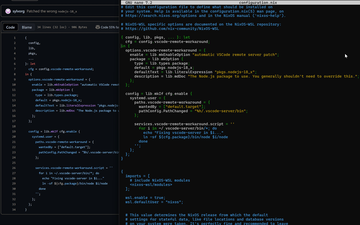
Download ANhjzWUkI9.jpg | 18:07:47 |
| balanced_design | Im back to trying to get this to work.
I had a default configuration.nix and I tried to include this in many many ways, all of which failed.
This is what my current attempt looks like: | 18:07:53 |
 K900 K900 | Just take lines 20-32 from that config | 18:08:53 |
| K900 | And paste them into the normal place you set options in | 18:09:04 |
| balanced_design | I tried again a few ways to do that, still getting errors on rebuild switch. This is what my config looks like: | 18:16:43 |
| balanced_design | 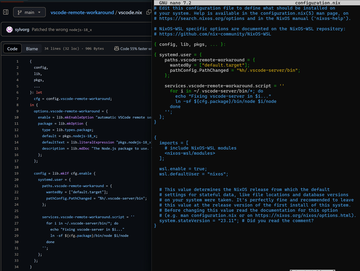
Download DgBa5EArLU.jpg | 18:16:44 |
| K900 | It needs to be in the same {} as the rest of your confif | 18:17:33 |
| chrillefkrr | Remove lines 23-26 from your configuration.nix, i.e. remove those closing and opening }\n\n{ brackets | 18:18:31 |
| balanced_design | 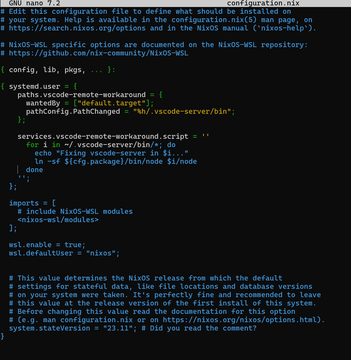
Download eCADLy8eDm.jpg | 18:27:22 |
| balanced_design | I removed those lines, still got errors. Im sorry. | 18:27:24 |
| K900 | What is the error exactly? | 18:28:47 |
| K900 | Oh | 18:29:00 |
| balanced_design | 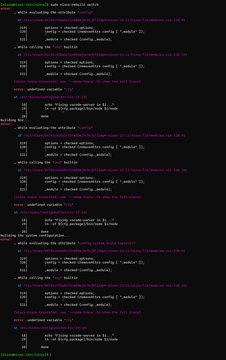
Download WindowsTerminal_jvOOSmBd1l.jpg | 18:29:18 |
| K900 | Replace cfg.package with pkgs.nodejs-18_x | 18:29:29 |
| balanced_design | Oh my god, rebuild switch works. Thank you so much for the help.
Sadly vscode on WSL isnt working with it yet. Ill try to search for answers there. Thank you so so much. | 18:35:14 |
| K900 | You probably need to restart vscode | 18:35:38 |
| K900 | And also possibly remove ~/.vscode-server | 18:35:55 |
| K900 | And maybe restart the VM just to be sure | 18:36:09 |
| balanced_design | I did the 3rd, before even trying the first time. I tried restarting vscode aswell, also didnt work.
Heres my error in case it helps.
What do you mean by "remove ~/.vscode-server"? Theres isnt a "~" character, so I assume you mean remove some of the characters before it? | 18:41:52 |
| balanced_design | 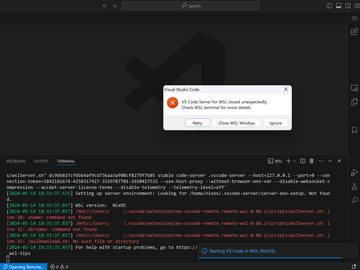
Download XBmgiHtfWs.jpg | 18:41:57 |
| K900 | I mean remove the directory on disk | 18:43:07 |
| K900 | As in /home/nixos/.vscode-server | 18:43:21 |
| K900 | But also I'm pretty sure the issue you're seeing is both fixed in newer NixOS-WSL and fixed in newer vscode | 18:43:39 |
