| 8 May 2024 |
 K900 K900 | I don't really use Android apps though | 14:25:47 |
 balanced_design balanced_design | Thanks for answering. Sadly in the past I've tried the android studio emulator (which is what I assume you mean), aswell as nox a long time ago, and I'm using WSA now.
If waydroid on WSL doesnt work out I'll google if theres some other "official android emulator" that you could have been refering to. | 14:32:51 |
| balanced_design | Thanks again | 14:33:34 |
| K900 | I do mean the Android Studio emulator | 14:34:04 |
 nzbr (they/it) nzbr (they/it) | In my experience that one is really slow though (especially compared to WSA)
Some time ago I used Genymotion Desktop, but I have no idea how good their free version is now. And if you can stand adware, BlueStacks had really good performance last time I used it; it's just really annoying (at least they don't seem to make you download random apps to be allowed to continue using it anymore) | 14:41:30 |
| balanced_design | Ive done alot of searching before, never heard of genymotion. Looks promising, thank you. | 17:09:37 |
| balanced_design | In reply to @k900:0upti.me
For VSCode, the easiest workaround is probably https://github.com/K900/vscode-remote-workaround/blob/main/vscode.nix K900, sorry to bother, that link you sent here. Is this supposed to go into the nix config?
I tried to some searching for other places a .nix file may need to go, but didnt find any general overview with a cursory search. | 17:14:52 |
| K900 | In reply to @balanced_design:matrix.org
K900, sorry to bother, that link you sent here. Is this supposed to go into the nix config?
I tried to some searching for other places a .nix file may need to go, but didnt find any general overview with a cursory search. Well you can just copy lines 20-32 into your config | 17:17:29 |
| 9 May 2024 |
|  @senor-burns:matrix.senor-burns.net left the room. @senor-burns:matrix.senor-burns.net left the room. | 15:50:42 |
|  SomeoneSerge (back on matrix) changed their display name from SomeoneSerge (Way down Hadestown) to SomeoneSerge (UTC+3). SomeoneSerge (back on matrix) changed their display name from SomeoneSerge (Way down Hadestown) to SomeoneSerge (UTC+3). | 17:11:27 |
|  Charles Hamilton joined the room. Charles Hamilton joined the room. | 19:19:18 |
| 10 May 2024 |
|  isabel changed their profile picture. isabel changed their profile picture. | 13:15:09 |
| 11 May 2024 |
|  98765abc joined the room. 98765abc joined the room. | 06:22:56 |
| 98765abc set a profile picture. | 07:09:55 |
| 13 May 2024 |
|  pm5k joined the room. pm5k joined the room. | 10:08:04 |
| pm5k | Hi, I am currently having trouble figuring out why my wsl install of nix isn't seeing windows binaries available to it (explorer.exe for instance) nor can I see the windows path prepended to my nixOS path.
My config for the system (wsl specifically) is:
wsl = {
  enable = true;
  defaultUser = "redacted";
  nativeSystemd = true;
  interop.register = true;
  wslConf.network.hostname = "nixwsl";
};
Based on the documentation provided here: https://nix-community.github.io/NixOS-WSL/options.html the following options default to true and as such I assume they are set whether or not I explicitly define them in the block above?
- wsl.interop.includePath
- wsl.wslConf.interop.enabled
- wsl.wslConf.interop.appendWindowsPath
However upon trying to run "explorer.exe" - it simply does not work. Not so on my orther wsl VM running Arch where the path seems to be appended properly. Can anyone help?
| 10:16:31 |
| K900 | What shell are you using? | 10:28:04 |
| pm5k | In reply to @k900:0upti.me
What shell are you using? zsh | 10:30:20 |
| K900 | Make sure programs.zsh.enable is enabled in your config | 10:30:35 |
| pm5k | 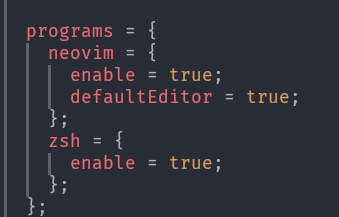
Download image.png | 10:31:04 |
| pm5k | This is in configuration.nix | 10:31:12 |
| pm5k | 
Download image.png | 10:31:42 |
| pm5k | I also use this: | 10:31:43 |
| K900 | That is probably what's breaking it then | 10:31:59 |
| pm5k | Since I want my zshrc transferrable I am sourcing it this way | 10:31:59 |
| pm5k | Does not seem to be as if I comment that out, and not use that symlink letting zsh gen a base config it still does not work | 10:33:24 |
| pm5k | Oh okay so you know what the issue was? | 10:36:38 |
| pm5k | Simply logging out from the profile does not reapply the path stuff | 10:36:53 |
| pm5k | you need to execute wsl --shutdown for this to be picked up | 10:37:06 |
| pm5k | Just tried it as a last ditch effort and it worked | 10:37:17 |
